Uninstalling Indigo
In this guide
This guide shows the steps to follow when uninstalling Indigo from your Mac, including the server application, the client application and the folder structure (including details that apply to a specific version of Indigo.
Uninstalling the Server
To uninstall the Indigo Server and all of its data and configuration files, first deactivate Indigo on your Mac by selecting the Indigo 2025.2->License Details... menu item and clicking the Deactivate License button. You'll get the following warning dialog:
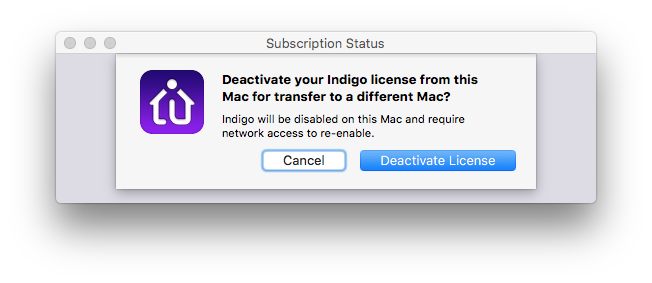
Then make sure that you have the server and client completely shut down (select Stop Server from the Indigo 2025.2 menu if the server is still running before you quit the Indigo Mac Client).
Then, delete the following files:
/Library/Application Support/Perceptive Automation/Indigo 2025.2/~(your user folder)/Library/LaunchAgents/com.perceptiveautomation.IndigoServer2.plist- Optional : If you don't use Python 3.11 for anything (other than Indigo 2025.2), you can delete this folder:
/Library/Frameworks/Python.framework/Versions/3.11and this file:/Library/Frameworks/Python.framework/Versions/CurrentNote: this will leave any other version of Python alone including any previous versions that older Indigo installs may have installed (if you plan on reverting to an older version). To completely remove all Python installations that any version of Indigo may have installed, just delete the entire Python framework:/Library/Frameworks/Python.framework
Uninstalling the Mac Client
To also uninstall the Indigo Mac Client delete the following files:
/Applications/Indigo 2025.2.app~(your user folder)/Library/Preferences/com.perceptiveautomation.indigo-2025-1.plist~(your user folder)/Library/Preferences/Indigo 2025.2 Client Prefs.indiPref~(your user folder)/Library/Preferences/Indigo 2025.2 Client Settings.indiPref
Note your Mac has two different Library folders. One is in your the home directory of the account Indigo runs under and the other is at the root level of the drive. In Mac OS X Lion and higher the user's home Library folder is hidden in the Finder so you'll have to use the Go to Folder... menu item in the Finder and type in the path (~/Library/Preferences) which will open a Finder window to the Preferences folder.
If you remove the Mac client application before shutting down the server, then delete the rest of the files above and reboot.
Uninstalling Older Indigo Versions
To uninstall older versions but leave 2025.2 installed correctly, delete these:
-
Indigo 2025.1:
/Library/Application Support/Perceptive Automation/Indigo 2025.1//Applications/Indigo 2025.1.app
-
Indigo 2024.2:
/Library/Application Support/Perceptive Automation/Indigo 2024.2//Applications/Indigo 2024.2.app
-
Indigo 2024.1:
/Library/Application Support/Perceptive Automation/Indigo 2024.1//Applications/Indigo 2024.1.app
-
Indigo 2023.2:
/Library/Application Support/Perceptive Automation/Indigo 2023.2//Applications/Indigo 2023.2.app
-
Indigo 2023.1:
/Library/Application Support/Perceptive Automation/Indigo 2023.1//Applications/Indigo 2023.1.app
-
Indigo 2022.2:
/Library/Application Support/Perceptive Automation/Indigo 2022.2//Applications/Indigo 2022.2.app
-
Indigo 2022.1:
/Library/Application Support/Perceptive Automation/Indigo 2022.1//Applications/Indigo 2022.1.app
-
Indigo 2021.2:
/Library/Application Support/Perceptive Automation/Indigo 2021.2//Applications/Indigo 2021.2.app
-
Indigo 2021.1:
/Library/Application Support/Perceptive Automation/Indigo 2021.1//Applications/Indigo 2021.1.app
-
Indigo 7.5:
/Library/Application Support/Perceptive Automation/Indigo 7.5//Applications/Indigo 7.5.app
-
Indigo 7.4:
/Library/Application Support/Perceptive Automation/Indigo 7.4//Applications/Indigo 7.4.app
-
Indigo 7.3:
/Library/Application Support/Perceptive Automation/Indigo 7.3//Applications/Indigo 7.3.app
-
Indigo 7.2:
/Library/Application Support/Perceptive Automation/Indigo 7.2//Applications/Indigo 7.2.app
-
Indigo 7.0 and 7.1:
/Library/Application Support/Perceptive Automation/Indigo 7//Applications/Indigo 7.app
-
Indigo 6 and prior (substitute the previous version # for 6):
/Library/Application Support/Perceptive Automation/Indigo 6//Applications/Indigo 6.app
Note that these (specifically the first item in each) serve as a backup in case you want to revert, so you might want to consider zipping up the folder (not the client app) and saving it off before deleting if you think you might want to revert for some reason.