Advanced PowerLinc Options
In this guide
Covers the Advanced PowerLinc Options dialog: LED brightness controls, signal timing settings, and link sync operations including full factory reset. These options are only needed for specific troubleshooting scenarios or when instructed by Indigo support.
Indigo provides some advanced options for the various PowerLinc Insteon interfaces. Select Configure... from the Interfaces->Insteon/X10 Power Line menu, then (assuming you have a PowerLinc interface selected) click on the Interface Options... button. You'll see the Advanced PowerLinc Options dialog:
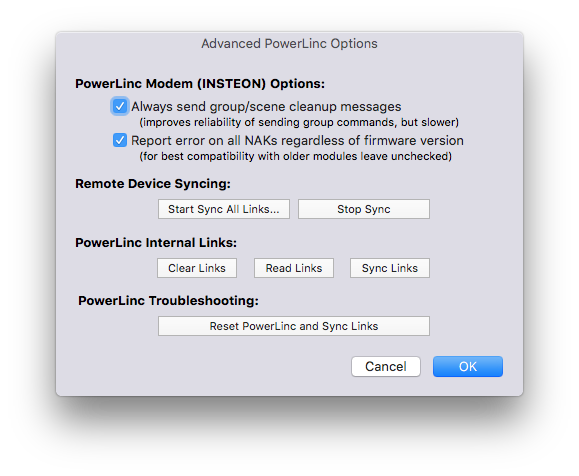
The first two options should always be checked by default - you really only want to disable those options if the Indigo Support team recommends it.
From this dialog, you can also perform some other link syncing operations:
- Start/Stop Link Sync (same as using the menu items on the
Interfaces->Insteon/X10 Power Linemenu) - On your PowerLinc, you can clear all of its internal links, read all the links, and sync links. You normally won't use these options unless instructed by Indigo Support
- You can completely reset your PowerLinc and resync the links all in one go - this is roughly synonymous to doing a factory reset, but not quite. Indigo support will often recommend doing a factory reset vs using this option because the factory reset performs some actions that we can't do through software.